
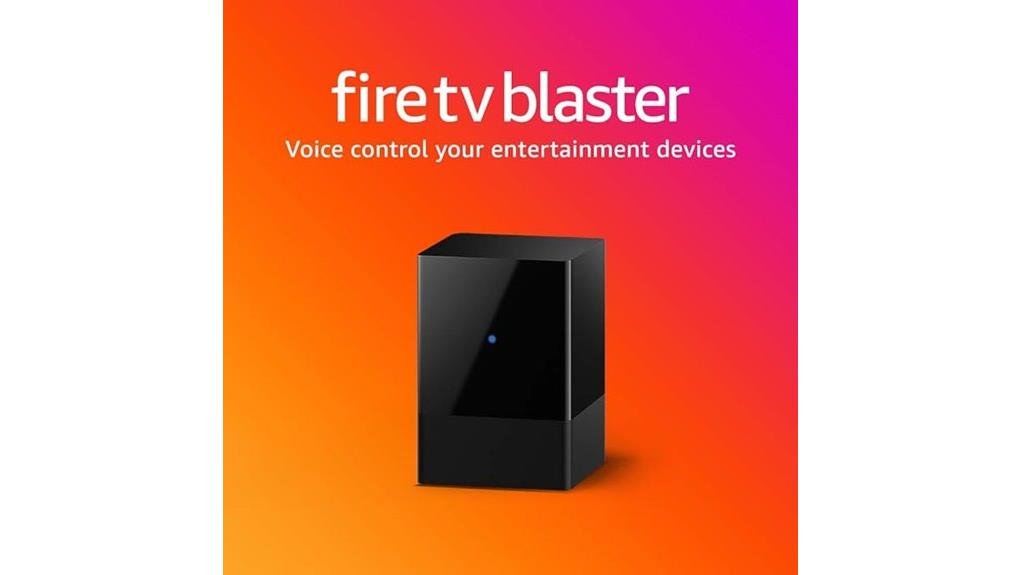
The Amazon Fire TV Blaster measures 2.4 x 1.5 x 1.5 inches and serves as an infrared bridge, enabling Alexa voice commands for TVs, soundbars, and cable boxes. It requires a compatible Fire TV Stick (Lite, 2nd Gen+, 4K, or 3rd Gen) paired with any Echo device, delivering hands-free power, volume, and input control from over 20 feet. Setup takes roughly fifteen minutes through the Alexa app, though Bluetooth-only devices remain incompatible. Priced around $35 with a 90-day warranty, this compact unit integrates non-smart displays into connected ecosystems, and the sections that follow examine whether its voice convenience justifies the investment.
Key Takeaways
- Fire TV Blaster converts Alexa voice commands into infrared signals for controlling TVs and soundbars.
- Works with Fire TV Stick Lite, 2nd Gen+, Stick 4K, or 3rd Gen plus any Echo device.
- Enables hands-free power, volume, and HDMI switching without touching physical remotes.
- Setup requires fifteen minutes, a mobile app, and verification of IR-enabled device compatibility.
- $35 price point offers low-risk smart home integration with 90-day warranty protection.
What Can (and Can’t) Fire TV Blaster Control?
The Fire TV Blaster functions as a dedicated infrared bridge, translating Alexa voice commands into signals that legacy entertainment hardware can understand. It controls power, volume, and HDMI inputs on compatible TVs, soundbars, cable boxes, and A/V receivers through IR signals.
Voice command limitations become apparent with Bluetooth-only devices, streaming sticks without IR capabilities, and hardware lacking traditional remote sensors.
Device compatibility concerns center on required pairing: users must own specific Fire TV models (Stick Lite, 2nd Gen+ Stick, 4K Stick, or 3rd Gen Fire TV) plus an Echo speaker or display.
The Blaster measures 1.5″ x 2.2″ x 1.5″, connects via 802.11 a/b/g/n Wi-Fi, and requires Fire OS 5.0, iOS 10, or Android 5. No universal compatibility exists.
Is Your TV Compatible With Fire TV Blaster?
Whether your existing television will cooperate with Amazon’s infrared bridge depends largely on its age and underlying control technology, not merely its brand or screen size. Fire TV Blaster demands specific companion hardware for voice integration to function, creating a compatibility ecosystem rather than standalone operation.
| Required Component | Compatible Models | Purpose |
|---|---|---|
| Fire TV Device | Stick Lite, Stick 2nd Gen+, Stick 4K, Fire TV 3rd Gen | Processing hub |
| Echo Device | Any smart speaker or display | Far-field voice capture |
| TV/Accessory | IR-enabled TV, soundbar, cable box | Controlled endpoint |
TV compatibility ultimately hinges on infrared reception, not smart features, liberating older equipment from obsolescence through voice integration.
Does Fire TV Blaster Voice Control Beat Your Remote?
How exactly does shouting commands across the living room compare to the familiar click of physical buttons? The voice control advantages become apparent when considering remote limitations that tether users to line-of-sight operation and manual navigation.
- Hands-free operation eliminates reaching, searching, and pointing.
- Simultaneous control across multiple IR devices through single commands.
- Far-field recognition via Echo devices captures speech from 20+ feet.
The Fire TV Blaster measures 1.5″ x 2.2″ x 1.5″ and weighs 3.9 oz, connecting via 802.11 a/b/g/n Wi-Fi.
It liberates viewers from physical constraints, though traditional remotes retain tactile precision for those preferring direct manipulation.
How Hard Is Fire TV Blaster to Set Up?
Setting up the Fire TV Blaster requires minimal technical expertise, though the process involves several interconnected components that demand careful attention to compatibility requirements. The device measures 1.5″ x 2.2″ x 1.5″ and weighs 3.9 oz, connecting via 802.11 a/b/g/n Wi-Fi across 2.4 and 5 GHz bands.
| Setup Component | What You’ll Need |
|---|---|
| Fire TV Device | Stick Lite, 2nd Gen+ Stick, 4K Stick, or 3rd Gen Fire TV |
| Echo Device | Any smart speaker or display for far-field voice control |
| Mobile App | Fire TV and Alexa apps on iOS 10+ or Android 5+ |
| Power Connection | 5W adapter with 1.5m USB cable (included) |
| IR Setup | Extender cable for hidden entertainment components |
Most setup challenges center on verifying IR-controlled device compatibility before beginning. User experiences generally report straightforward configuration when compatibility requirements are met first, with the entire process typically completing within fifteen minutes.
Is Fire TV Blaster Worth Buying in 2024?
Once the initial configuration is complete, prospective buyers must weigh whether this compact IR controller remains a sound investment nearly five years after its release.
For households seeking seamless voice control benefits and expanded smart home integration, the Blaster delivers measurable utility at modest cost. Its 1.5″ x 2.2″ x 1.5″ footprint conceals substantial capability, enabling hands-free operation of legacy IR devices without replacing functional hardware.
Consider these factors:
- Eliminates remote hunting through universal Alexa commands across compatible Echo devices
- Bridges non-smart TVs and soundbars into cohesive ecosystems without new purchases
- Retains relevance where HDMI-CEC proves unreliable or unavailable
The 90-day warranty and $35 typical pricing position it as low-risk enhancement rather than essential upgrade.
Frequently Asked Questions
Does Fire TV Blaster Work Without Internet Connection?
The Fire TV Blaster requires internet connectivity for full voice control functionality, though basic IR commands may function locally. Its fire tv compatibility guarantees seamless integration when connected, liberating users from manual remote dependency through Alexa-powered automation.
Can Multiple Blasters Control the Same TV?
No, multiple Fire TV Blasters cannot control the same TV simultaneously due to Blaster compatibility limitations. A multi device setup requires assigning each Blaster to separate, distinct entertainment devices for maximum voice control liberation.
Is a Fire TV Device Absolutely Required?
Yes, a Fire TV device is required. Fire TV advantages include seamless streaming integration, while smart home integration releases hands-free liberation from remote clutter, empowering users to command their entertainment ecosystem through voice alone.
How Far Can the IR Signal Reach?
The IR signal reaches approximately ten meters, though distance limitations tighten with obstacles. Signal interference lurks in shadows, demanding ideal placement—liberation awaits those who position wisely, breaking free from remote-chasing chains.
Does It Support Bluetooth Devices?
The Fire TV Blaster lacks Bluetooth compatibility and device pairing capabilities, relying solely on infrared signals. Users seeking wireless liberation must accept this limitation, as only IR-controlled devices integrate with this voice control solution.
Conclusion
The Fire TV Blaster proves that good things come in small packages, though its 1.5-inch frame carries substantial caveats. For Alexa-committed households with compatible hardware, this $35 IR bridge eliminates remote hunts and streamlines daily viewing through voice-activated power, volume, and input controls. Yet ecosystem lock-in demands careful evaluation: those outside Amazon’s orbit, or with complex multi-device setups, may find traditional universal remotes more flexible. Ultimately, convenience has its price, and compatibility determines its true value.



Leave a Reply