
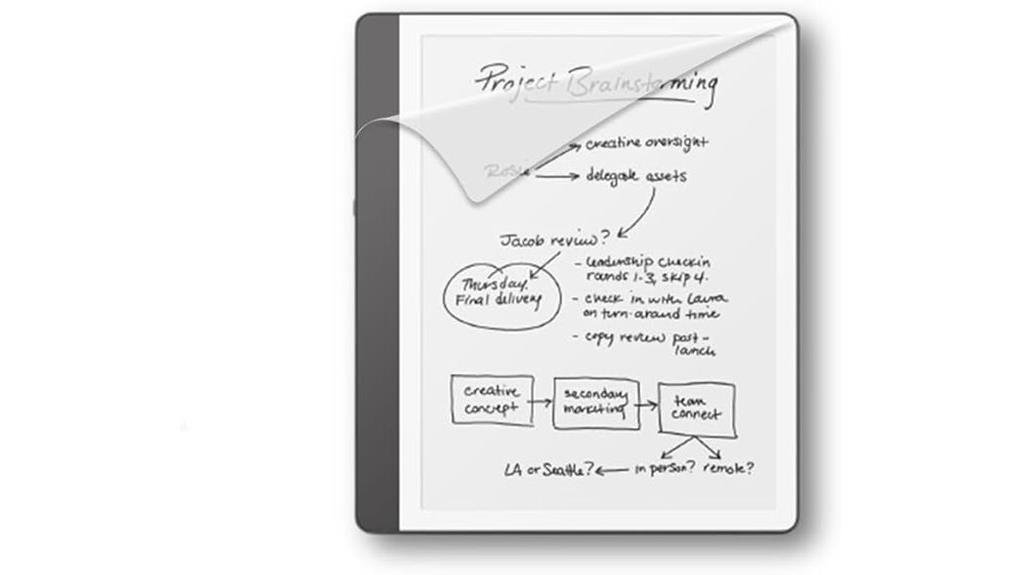
The Kindle Scribe screen protector measures precisely 10.2 inches, matching the E Ink display’s dimensions for edge-to-edge coverage. Its micro-textured matte surface reduces glare while adding tactile friction that stabilizes Premium Pen strokes, mimicking paper resistance for improved handwriting accuracy. The anti-glare coating scatters harsh light, maintaining visual clarity across varying conditions. Installation requires minimal effort with included tools: microfiber cloth, dust absorber, and squeegee card. Frequent annotators benefit most from scratch prevention, though casual readers may find the factory glass sufficient. Extensive details about installation techniques and performance comparisons follow below.
Key Takeaways
- Anti-glare coating reduces harsh reflections for comfortable outdoor reading sessions.
- Micro-textured surface mimics paper feel, improving handwriting control and stroke accuracy.
- 10.2-inch precision-cut protector maintains E Ink display clarity and touch responsiveness.
- Installation kit includes guide, cloth, squeegee, and dust absorber for bubble-free application.
- Long-term display preservation justifies investment for frequent annotators and daily stylus users.
Does Your Kindle Scribe Really Need a Screen Protector?
Why exactly does a 10.2-inch E Ink display, engineered specifically for extended reading sessions and handwritten note-taking, warrant an additional layer of protection?
Screen durability varies by use case. The Kindle Scribe’s 10.2-inch, 300 ppi display resists minor impacts, yet daily stylus contact creates gradual wear.
Personal preference ultimately determines necessity: frequent annotators benefit from scratch prevention, while occasional readers may find the factory surface sufficient.
The anti-reflective coating and matte texture add tangible value for dedicated note-takers, reducing glare and mimicking paper resistance.
For those prioritizing long-term display preservation, the investment proves practical. Others content with careful handling might redirect resources elsewhere.
How This Screen Protector’s Anti-Glare Coating Transforms Reading
Although E Ink displays already outperform traditional tablets in bright environments, the Scribe’s factory glass retains enough reflectivity to create noticeable distractions during outdoor reading sessions. This is precisely where this screen protector’s anti-glare coating demonstrates its most practical advantage.
The anti-glare benefits extend beyond mere surface treatment, fundamentally altering how light interacts with the display. By scattering incident light rather than reflecting it directly, the matte finish eliminates harsh hotspots that strain the eyes.
This transformation yields measurable reading comfort improvements, particularly during extended sessions in variable lighting conditions where unprotected screens would compromise visual clarity and focus.
How the Screen Protector’s Texture Changes Handwriting
Transforming the Kindle Scribe from a passive reading device into an active writing tool requires surface friction that factory glass simply cannot provide. This screen protector’s micro-textured finish delivers precisely the tactile resistance that handwriting demands.
The matte surface creates subtle drag against the Premium Pen nib, generating textured feedback that mimics natural paper resistance. This controlled friction improves handwriting accuracy by stabilizing stroke direction and reducing slip-induced errors.
Users experience enhanced precision during note-taking, sketching, and annotation, as the 0.3mm-thick PET material maintains pen responsiveness while adding essential grip. The transformation from slick glass to purposeful texture fundamentally elevates the writing experience without compromising display clarity or touch sensitivity.
How to Install Your Screen Protector Without Bubbles
Once the textured writing surface has been secured, proper installation technique determines whether that carefully engineered friction translates into daily utility or becomes obscured beneath trapped air and misaligned edges.
The included installation guide provides step-by-step instructions, while the microfiber cloth, dust absorber, and squeegee card facilitate bubble removal through systematic smoothing from center to edges.
Installation tips emphasize clean environments, precise alignment with Kindle Scribe bezels, and gradual adhesive application to prevent particle intrusion.
The 0.33mm thickness maintains touch sensitivity, and anti-glare coating integrity depends upon flawless application.
Proper technique guarantees optical clarity and paper-like responsiveness remain uncompromised.
Kindle Scribe Screen Protector: What’s in the Box
The contents of a screen protector package often reveal as much about manufacturer priorities as the product itself, and this offering arrives with deliberate completeness.
For users prioritizing product compatibility, the installation guide addresses model-specific nuances, while installation tips guarantee proper alignment with the Kindle Scribe’s 10.2-inch display.
The package contains:
- One precision-cut screen protector measuring 10.2 inches diagonally
- Step-by-step installation guide with illustrated techniques
- Microfiber cloth for pre-installation cleaning
- Squeegee card and dust absorber for bubble-free application
These components eliminate common friction points, empowering users to achieve professional results without external assistance or additional purchases.
Frequently Asked Questions
Does It Work With the Magnetic Cover?
The screen protector functions independently of magnetic covers, raising no durability concerns. For seamless coexistence, application tips suggest precise alignment during installation to guarantee full compatibility with accessories seeking liberation from device limitations.
Can I Remove and Reuse It Later?
Ah, the eternal dream of adhesive freedom—sadly, this protector clings like a possessive ex. Reuse remains impossible without installation tips failing and durability concerns multiplying. Liberation demands purchasing anew, comrade.
Will It Affect Screen Brightness Settings?
The screen protector preserves screen clarity without diminishing touch sensitivity or brightness control. Users remain fully empowered to adjust illumination levels freely, experiencing unhindered visual liberation through the anti-reflective coating’s glare reduction across all settings.
Is It Compatible With Screen Cleaning Solutions?
Like armor guarding a warrior’s vision, this protector enhances screen durability without rejecting gentle cleaning solutions. Standard screen-safe sprays paired with soft cloths become liberating cleaning tips, freeing users from smudge imprisonment without damage.
How Thick Is the Protector in Millimeters?
The screen protector measures approximately 0.3 millimeters thick. For durability comparison, this slim profile rivals tempered glass alternatives. Installation tips suggest working in dust-free environments to guarantee flawless adhesion without compromising the liberating, paper-like writing experience.
Conclusion
For dedicated note-takers, this specialized protection proves worthwhile. Consider Maria, a graduate student who annotates research papers daily; after installing the matte protector, her Premium Pen glided with paper-like resistance, eliminating the glass-slip frustration that previously disrupted her workflow. The anti-glare coating additionally allowed comfortable outdoor reading during her campus commute. While not essential for casual readers, users prioritizing handwritten productivity and versatile lighting conditions will find measurable value in this targeted accessory investment.



Leave a Reply