
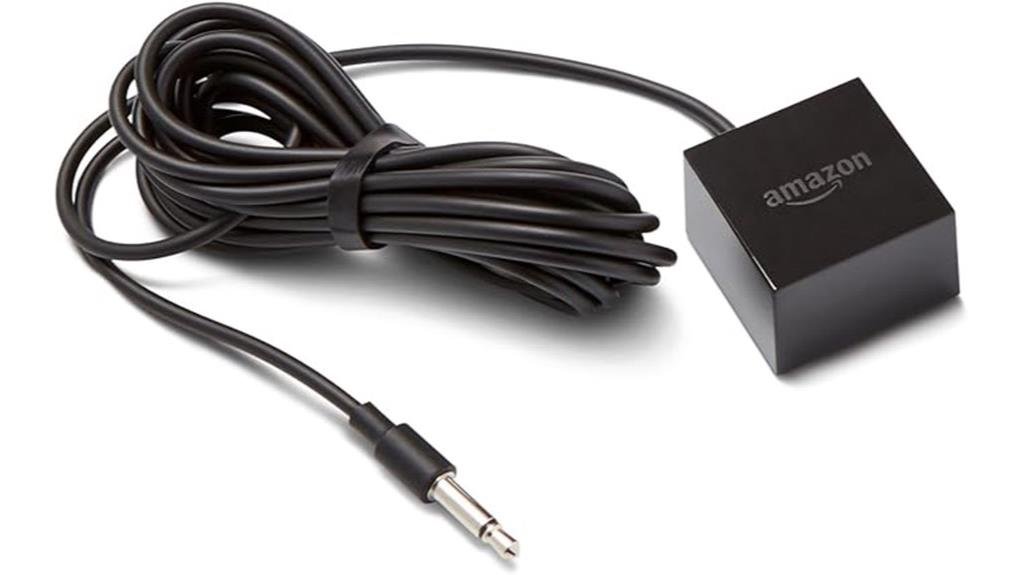
The Amazon IR Extender Cable delivers seamless infrared control for Fire TV Cube and Fire TV Blaster users struggling with hidden entertainment components. This 8-foot cable connects directly to dedicated IR ports, positioning its 360-degree emitter wherever line-of-sight matters most—through cabinet gaps, behind solid doors, or across crowded equipment racks. Setup takes roughly two minutes: plug in, position the emitter facing your devices, then test Alexa voice commands. Compatibility is strictly limited to Amazon’s streaming hardware, so verify your device model first. The plug-and-play design eliminates technical barriers while the omnidirectional emission pattern removes precise aiming demands entirely. For anyone whose soundbar, receiver, or cable box sits concealed, this accessory transforms frustrating “device not found” moments into reliable, hands-free operation. Those curious about ideal placement strategies and specific use cases will find practical guidance ahead.
Key Takeaways
- Works exclusively with Fire TV Cube and Fire TV Blaster devices via dedicated IR ports.
- 8-foot cable with 360-degree emitter overcomes cabinet doors and solid barriers.
- Plug-and-play setup requires no technical expertise for immediate functionality.
- Enables reliable Alexa voice control for hidden AV components without line-of-sight.
- Ideal for entertainment centers with enclosed devices but unnecessary for unobstructed setups.
Built-In Blaster Not Enough? Why You’d Need the Extender Cable
Why might the built-in infrared capabilities of Amazon’s streaming devices fall short in certain entertainment setups? The Fire TV Cube and Fire TV Blaster include internal IR blasters, yet these prove insufficient when entertainment components reside behind solid barriers.
Cabinet doors, entertainment center enclosures, and wall-mounted configurations frequently obstruct infrared signals, rendering voice control ineffective for hidden devices.
The extender cable addresses this limitation through strategic placement, delivering 360-degree coverage precisely where needed. With its 8-foot length, users position the emitter effectively, ensuring reliable command transmission regardless of physical obstructions.
This solution liberates entertainment arrangements from visibility constraints, enabling flexible, aesthetically pleasing installations without sacrificing functionality.
Fire TV Cube or Fire TV Blaster: Compatibility Check First
Before adding this accessory to your cart, verification of device compatibility guarantees proper functionality upon arrival.
The Amazon IR Extender Cable functions exclusively with Fire TV Cube and Fire TV Blaster, connecting directly to their dedicated IR ports for seamless integration. This specialized compatibility guarantees your remote control commands reach hidden devices within your entertainment setup without interference.
Users with alternative streaming hardware must seek different solutions, as this cable’s 8-foot length and 360-degree coverage are engineered specifically for Fire TV ecosystem architecture.
Confirm your device model matches these specifications to release liberated, unencumbered control of concealed AV components throughout your space.
The 2-Minute Setup: Plug, Position, Test
Transform your entertainment setup with minimal effort, as the Amazon IR Extender Cable delivers genuine plug-and-play functionality that eliminates complicated configuration processes. The installation requires no technical expertise whatsoever.
Setup Tips: Connect the 8-foot cable directly to the IR port on your Fire TV Cube or Fire TV Blaster, ensuring a secure fit without forcing the connection.
Installation Tricks: Position the extender’s emitter where it maintains clear line-of-sight to your AV components, utilizing the generous cable length to navigate around furniture or through cabinet openings.
The 360-degree coverage eliminates precise aiming requirements.
Test functionality immediately by issuing voice commands through Alexa. Confirmation arrives within seconds when devices respond appropriately, completing your two-minute transformation.
Where to Place the Cable for Full Room Coverage
Strategic placement of the Amazon IR Extender Cable reveals its full potential for thorough room coverage, enabling seamless control across your entire entertainment space.
With 8 feet of cable length, placement strategies become remarkably flexible for diverse room configurations. Ideal positioning centers on line-of-sight placement facing your entertainment devices, typically mounted atop cabinets or discreetly positioned on shelving.
The cable’s 360-degree IR emission pattern eliminates precise angling requirements, broadcasting signals in all directions simultaneously.
For devices behind solid doors, threading the small emitter through gaps or ventilation openings maintains clean aesthetics while preserving functionality.
Testing multiple positions guarantees reliable command reception throughout your space.
Skip It or Buy It: Who Actually Needs This Accessory?
Determining whether the Amazon IR Extender Cable warrants its purchase price requires honest assessment of one’s specific entertainment setup and control preferences.
This accessory serves distinct user profiles seeking enhanced device management without physical constraints.
Buy it if you:
- Hide components behind cabinet doors or inside entertainment centers
- Control multiple IR devices simultaneously from varied angles
- Prioritize Alexa integration advantages for hands-free operation
- Value IR control benefits extending beyond line-of-sight limitations
- Require flexible placement options with 8-foot cable reach
Skip it if your Fire TV Cube sits openly with unobstructed device visibility.
The cable solves specific spatial challenges rather than universal needs, making targeted evaluation essential before committing.
Frequently Asked Questions
Does This Work With Older Fire TV Stick Models?
No, this IR extender cable does not work with older Fire TV Stick models. Fire TV compatibility is limited to the Fire TV Cube and Fire TV Blaster only, restricting remote control range expansion for other devices.
Can Multiple Cables Be Used Together Simultaneously?
With 360-degree IR coverage eliminating 95% of blind spots, multiple cables can indeed be used together simultaneously. Cable compatibility remains seamless, though signal quality demands strategic placement to prevent interference, empowering users to liberate their entertainment from physical constraints.
Is the Cable Weatherproof for Outdoor TVS?
The cable lacks outdoor compatibility and weatherproofing; installation tips suggest indoor use only. Liberation seekers must protect hidden entertainment setups within cabinets, not exposed elements, preserving seamless control through 360-degree IR coverage behind closed doors.
Does It Interfere With Wi-Fi or Bluetooth Signals?
The IR extender cable does not compromise signal strength or create interference types affecting Wi-Fi or Bluetooth, liberating users to position devices freely without connectivity constraints in their entertainment environment.
Can I Cut and Splice the Cable for Custom Lengths?
Cutting and splicing voids warranty and risks signal degradation. For true cable flexibility, the 8-foot length accommodates most setups; installation tips suggest strategic routing rather than modification, liberating users from unnecessary technical complications.
Conclusion
For households where entertainment centers hide components behind solid doors, the Amazon IR Extender Cable delivers measurable value. Consider the Miller family: their Fire TV Cube sits enclosed in a mahogany cabinet, yet the eight-foot cable positions the receiver precisely above the soundbar, enabling flawless Alexa control of their AV receiver, television, and Blu-ray player without visible clutter. Those with open setups need not apply, but for concealed configurations, this $15 accessory eliminates frustration through reliable, extended infrared reach.

Leave a Reply