
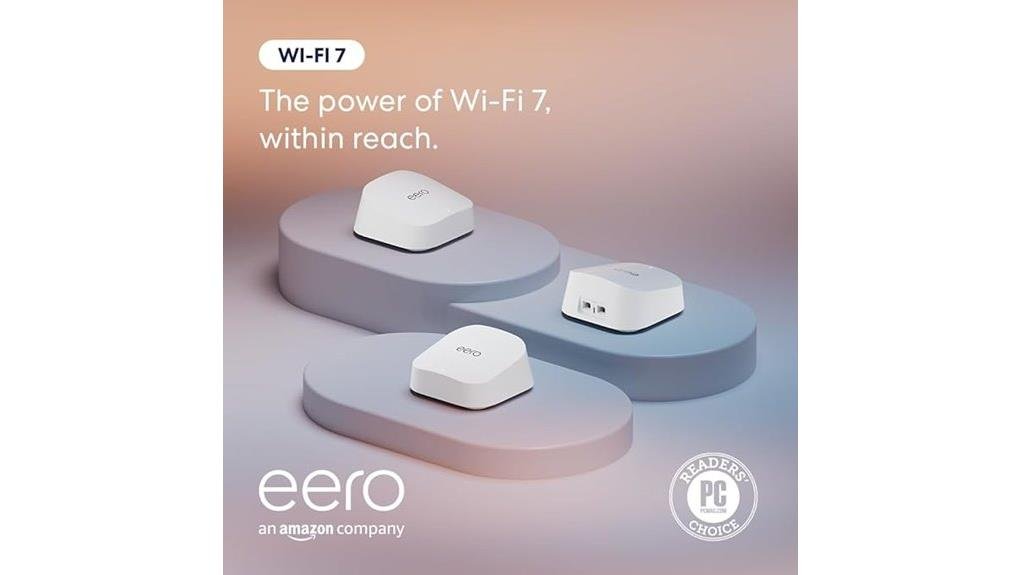
The Amazon Eero 7 offers a significant upgrade in home Wi-Fi, utilizing advanced mesh technology to cover areas up to 6,000 square feet with speeds reaching 1.8 Gbps. It efficiently supports over 120 connected devices, providing seamless performance for streaming and high-bandwidth activities. The user-friendly setup process simplifies installation, while robust security features, including WPA3 encryption and parental controls, enhance network safety. To discover additional features and benefits of the Eero 7, explore further insights.
Key Takeaways
- The Amazon Eero 7 supports Wi-Fi 7, offering impressive speeds up to 1.8 Gbps for high-performance needs.
- Its mesh technology provides seamless coverage across areas up to 6,000 square feet, ideal for larger homes.
- Capable of connecting over 120 devices, it ensures efficient performance for multiple users and devices simultaneously.
- Enhanced security features, including WPA3 encryption and real-time monitoring, help maintain a secure network environment.
- The user-friendly setup process via the Eero app simplifies installation and optimizes network performance effortlessly.
Why the Amazon Eero 7 Is a Game Changer for Home Wi-Fi
The Amazon Eero 7 represents a significant advancement in home Wi-Fi technology, making it a compelling option for users seeking reliable connectivity.
Utilizing mesh technology, this dual-band router enhances user experience by providing seamless coverage across expansive areas, supporting up to 6,000 square feet.
With wireless speeds reaching 1.8 Gbps and the ability to connect over 120 devices, it caters to modern households’ demands.
Wireless speeds of 1.8 Gbps and support for over 120 devices meet the needs of today’s connected homes.
Additionally, advanced security features like WPA3 encryption and compatibility with smart home devices streamline integration.
What Makes the Eero 7 Stand Out From Earlier Models?
Advancements in technology have led to notable improvements in the Amazon Eero 7, distinguishing it from its predecessors. This model features advanced routing capabilities, enhancing performance with Wi-Fi 7 support, which allows for speeds up to 1.8 Gbps.
The new mesh technology optimizes coverage, reaching up to 6,000 square feet and accommodating over 120 devices seamlessly. Additionally, the Eero 7 boasts enhanced MIMO technology, enabling simultaneous data streams for multiple users.
With backward compatibility and robust security protocols, including WPA3 encryption, the Eero 7 not only elevates user experience but also guarantees a secure, liberated home network environment.
Eero 7: Optimizing Performance for Streaming and Multiple Devices
Streaming high-definition content and connecting multiple devices simultaneously can pose significant challenges for home networks, but the Amazon Eero 7 effectively addresses these needs.
With its advanced streaming optimization capabilities, users can enjoy uninterrupted viewing experiences across various platforms. The Eero 7 supports over 120 devices, making device management seamless and efficient, ensuring that each connection receives adequate bandwidth.
Its dual-band Wi-Fi 7 technology offers speeds up to 1.8 Gbps, allowing for multiple high-bandwidth activities without lag.
Setting Up Your Eero 7: A Quick Step-by-Step Guide
Setting up the Amazon Eero 7 is a straightforward process that can considerably enhance home network performance. Begin by connecting the main unit to a power source and your modem. Use the Eero app for the Wi-Fi setup, guiding you through mesh networking installation. Add additional units as needed, ensuring excellent coverage throughout your home.
| Step | Description | Benefit |
|---|---|---|
| Power Up | Connect to modem and power | Initial setup |
| App Download | Install Eero app | User-friendly interface |
| Add Units | Position additional Eeros | Expanded coverage |
| Test Connection | Check speed and reliability | Confirm excellent performance |
How Eero 7 Enhances Your Network Security With Advanced Features
Security in today’s digital landscape is paramount, and the Amazon Eero 7 addresses this need with a suite of advanced features designed to protect users’ networks.
It employs advanced encryption protocols, including WPA3, ensuring robust data protection. Users benefit from extensive parental controls, allowing them to manage content access for connected devices.
Additionally, the Eero 7 offers network monitoring capabilities, providing real-time insights into device activity. Effective device management simplifies the process of managing multiple connections, enhancing overall security.
The Eero 7 enhances security with real-time network monitoring and streamlined device management for effortless control over multiple connections.
With these features, the Eero 7 empowers users to maintain a secure and controlled digital environment effortlessly.
Frequently Asked Questions
How Does the Eero 7 Compare in Price to Other Mesh Routers?
The eero 7’s pricing positions it competitively among mesh router brands, offering advanced features at a reasonable cost. A careful pricing comparison reveals it balances performance with affordability, appealing to those seeking liberation from connectivity issues.
Can I Use Eero 7 With My Existing Modem?
The eero 7 exhibits compatibility with existing modems, facilitating effortless modem setup. Users can integrate it seamlessly into their home networks, enhancing connectivity while enjoying the freedom of expansive coverage and superior performance.
What Is the Range of Eero 7 in Urban Environments?
In urban environments, the eero 7 can effectively cover up to 6,000 square feet. However, signal interference from surrounding structures may impact connectivity, necessitating strategic placement for ideal performance and liberation from connectivity issues.
Does Eero 7 Support Gaming Consoles?
The eero 7 supports gaming consoles, ensuring robust gaming performance and console compatibility. Its advanced features facilitate seamless connections, empowering users to enjoy immersive gaming experiences without interruptions, liberating them from connectivity concerns.
How Many Eero 7 Units Do I Need for Optimal Coverage?
For ideal coverage, two to three eero 7 units are recommended, ensuring effective coverage zones throughout larger spaces. Strategic placement enhances connectivity, liberating users from connectivity issues and allowing seamless access to their digital environments.
Conclusion
To sum up, the Amazon eero 7 stands as a formidable contender in the domain of home Wi-Fi solutions. With its ability to deliver speeds up to 2.5 Gbps and cover expansive areas up to 6,000 square feet, it effectively caters to the needs of modern households. The router’s compatibility with over 120 devices and enhanced security features further solidify its place as a reliable choice, promising a seamless and secure internet experience for tech-savvy users.





Leave a Reply